Creativistas Web Creativistas Web
Web de tests psicológicos, con envío de resultados por email. Psychological tests, with email delivery of results.
Problemas técnicos y soluciones aplicadas:
1) Limitación incorrecta de caracteres en inputs críticos
Problema:Los campos “Nombre” y “Email” estaban limitados a 40 caracteres, lo cual afectaba especialmente al email (casos reales superan ese límite).
Resolución aplicada: Se ajustó el límite del campo email a 50 caracteres manteniendo el nombre en 40, configurándolo a nivel de input (propiedad maxLength en TextField), evitando cambios mayores en lógica de validación.
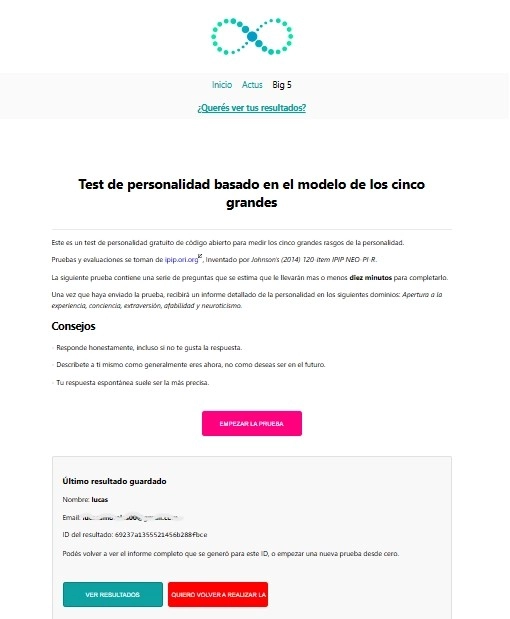
2) Mensaje de navegación “¿Querés ver tus resultados?” en una ubicación invasiva
Problema:El mensaje “¿Querés ver tus resultados?” se mostraba en la parte superior dentro del header en la ruta Big5, resultando intrusivo y rompiendo la intención de UX (se quería al final del contenido).
Resolución aplicada: Se localizó el origen real del mensaje mediante búsqueda global y se identificó que estaba en components/creativistas/Header.js. Se corrigió desde el componente correcto (header/layout) en lugar de duplicar lógica en páginas, lo que permitió reubicar/condicionar el bloque sin efectos colaterales.
3) Error en runtime por variable inexistente: ReferenceError: big5 is not defined
Problema:Al intentar mover código del header a la página pages/big5/index.js, se introdujo una referencia a big5 (y a dependencias como Link/info) que no existían en ese contexto, causando crash durante render (incluyendo render del servidor).
Resolución aplicada: Se eliminó la lógica copiada fuera de contexto y se reubicó donde correspondía (Header), o se reescribió la condición de forma compatible con el tipo de componente. Esto evitó mezclar lógica propia de un componente funcional con hooks (useRouter) dentro de un componente de clase sin adaptar el acceso al router.
4) Confusión al levantar el proyecto: Cannot find module ... app.js
Problema:El proyecto se intentaba iniciar desde una carpeta incorrecta, lo que provocaba que Node no encontrara app.js.
Resolución aplicada: Se estandarizó el flujo de arranque usando el directorio correcto (webapp/) y se ejecutó el script esperado (npm run dev), dejando el proyecto corriendo correctamente con Next.js + Express.
5) Migración operativa a MongoDB Atlas del cliente (multi-cuenta)
Problema:El proyecto estaba apuntando a una base Mongo propia, y se necesitaba migrar/operar contra la base del cliente (Atlas) con credenciales, cluster y string de conexión correctos.
Resolución aplicada: Se configuró la infraestructura mínima en MongoDB Atlas del cliente: Creación de cluster y database user
Obtención del connection string mongodb+srv://...
Configuración del MONGODB_URI en .env
Verificación de conectividad con logs (✅ MongoDB conectado)
6) Bloqueo por IP / Network Access en MongoDB Atlas
Problema:El acceso al cluster dependía de una IP permitida.
Resolución aplicada: Se configuró Network Access (IP Access List) habilitando 0.0.0.0/0 para permitir pruebas desde cualquier IP durante desarrollo.
7) Integración de SendGrid en cuenta del cliente (API Key + Sender Verification)
Problema:El envío de emails debía migrarse a la cuenta SendGrid del cliente.
Resolución aplicada: Se completó el setup en SendGrid: Creación de SENDGRID_API_KEY funcional (SG...)
Configuración de Single Sender Verification
Pruebas reales de envío confirmando que la integración funcionaba
8) Problemas en compatibilidad de Drivers
Problema:El proyecto tenia Drivers viejos que Next.js no dejaba levantar por falta de seguridad mínima
Resolución aplicada: Actualización de Drivers.
Mejoras / funcionalidades agregadas
A) Bloque “Último resultado guardado” en Big5 (UX)
Se incorporó la lectura de resultados previos desde localStorage mostrando: Nombre, email e ID del último resultado.B) Robustez del backend de emails (Big5)
Se mejoró el envío de emails con validaciones, fallback a HTML/text y envío no bloqueante.C) Observabilidad y diagnóstico en ambiente dev
Logs claros para estado de SendGrid, conexión MongoDB y errores detallados.Technical issues and applied solutions:
1) Incorrect character limit in critical inputs
Issue:The “Name” and “Email” fields were limited to 40 characters, which especially impacted emails (real-world emails can exceed that limit).
Applied fix: The email limit was increased to 50 characters while keeping the name at 40, configuring it directly at the input level (TextField maxLength) to avoid larger changes in the validation logic.
2) “Want to see your results?” message displayed in an intrusive location
Issue:The message appeared at the top inside the header on the Big5 route, becoming intrusive and breaking the intended UX (it was meant to appear at the end of the content).
Applied fix: A global search was used to locate the real source of the message, identifying it in components/creativistas/Header.js. The change was implemented in the correct component (header/layout) instead of duplicating logic in pages, allowing the block to be repositioned/conditioned without side effects.
3) Runtime crash due to missing variable: ReferenceError: big5 is not defined
Issue:While moving code from the header to pages/big5/index.js, a reference to “big5” (and dependencies like Link/info) was introduced where it didn’t exist, causing a crash during render (including server-side render).
Applied fix: The out-of-context copied logic was removed and placed back where it belongs (Header), or rewritten in a compatible way for the component type. This prevented mixing functional-component logic with hooks (useRouter) inside a class component without adapting router access.
4) Startup confusion: Cannot find module ... app.js
Issue:The project was started from the wrong directory, causing Node to fail to locate app.js.
Applied fix: The startup flow was standardized using the correct directory (webapp/) and the expected script (npm run dev), running the project properly with Next.js + Express.
5) Operational migration to the client’s MongoDB Atlas (multi-account)
Issue:The project was pointing to a personal Mongo database and needed to run against the client’s Atlas database with the correct credentials, cluster, and connection string.
Applied fix: Minimal infrastructure was configured on the client’s MongoDB Atlas: cluster and database user creation,
retrieval of the mongodb+srv:// connection string,
MONGODB_URI setup in .env,
connectivity verification via logs (✅ MongoDB connected).
6) IP / Network Access blocking in MongoDB Atlas
Issue:Cluster access depended on an allowed IP address.
Applied fix: Network Access (IP Access List) was configured allowing 0.0.0.0/0 to enable testing from any IP during development.
7) SendGrid integration on the client’s account (API Key + Sender Verification)
Issue:Email sending had to be migrated to the client’s SendGrid account.
Applied fix: SendGrid setup was completed: creation of a working SENDGRID_API_KEY (SG...),
Single Sender Verification configuration,
real delivery tests confirming the integration worked.
8) Driver compatibility issues
Issue:The project used outdated drivers that prevented Next.js from starting due to minimum security requirements.
Applied fix: Dependencies/drivers were updated.